
Artificial Intelligence is changing the way digital marketing teams research, plan, execute, and measure campaigns. From generating SEO content and creating social media strategies to analysing advertising performance and automating repetitive tasks, AI tools are becoming an important part of modern marketing operations.
However, simply using ChatGPT to generate captions or asking Gemini to write a blog article is only the starting point. The bigger opportunity lies in building structured AI-powered marketing workflows that can perform repeatable tasks, connect different applications, and support complex marketing activities.
This is where concepts such as AI Skills, Plugins and Integrations, and AI Agents become important.
Imagine a digital marketing team that needs to research keywords, prepare an SEO content calendar, create blog articles, publish content, monitor website performance, and generate monthly reports.
Instead of handling every activity manually, the team can use reusable AI instructions, connect marketing applications, and build AI-assisted workflows to coordinate different tasks.
Tools such as ChatGPT, Claude, Gemini, Microsoft Copilot, Perplexity, n8n, and Make can support different parts of this process.
In this article, we will explore how AI Skills, Plugins and Integrations, and AI Agents work, how they differ, and how digital marketers can use them in practical marketing activities.
1. Why Digital Marketers Need to Move Beyond AI Prompts
Most marketers begin their AI journey with simple prompts.
For example:
- Write an SEO-friendly blog article.
- Generate 10 social media captions.
- Suggest keywords for a website.
- Create Google Ads headlines.
- Analyse this advertising report.
These prompts can save time, but they often require marketers to repeat instructions, provide context, review outputs, and manually move information between applications.
As marketing operations become more complex, relying only on individual prompts can create several limitations.
Repetitive instructions: Marketers repeatedly explain brand guidelines, content formats, campaign objectives, and output requirements.
Disconnected applications: Research, advertising, analytics, CRM, and content management platforms may operate separately.
Manual execution: AI may prepare a report or recommendation, but a marketer still needs to transfer information, update records, and complete follow-up activities.
Inconsistent processes: Different team members may use different prompts and approaches, producing inconsistent results.
Limited scalability: Managing multiple campaigns, brands, websites, and marketing activities becomes difficult when every task requires individual attention.
To address these challenges, marketers need to move from isolated AI prompts towards reusable instructions, connected applications, and structured AI-powered workflows.
2. What Are AI Skills and How Can Marketers Use Them?
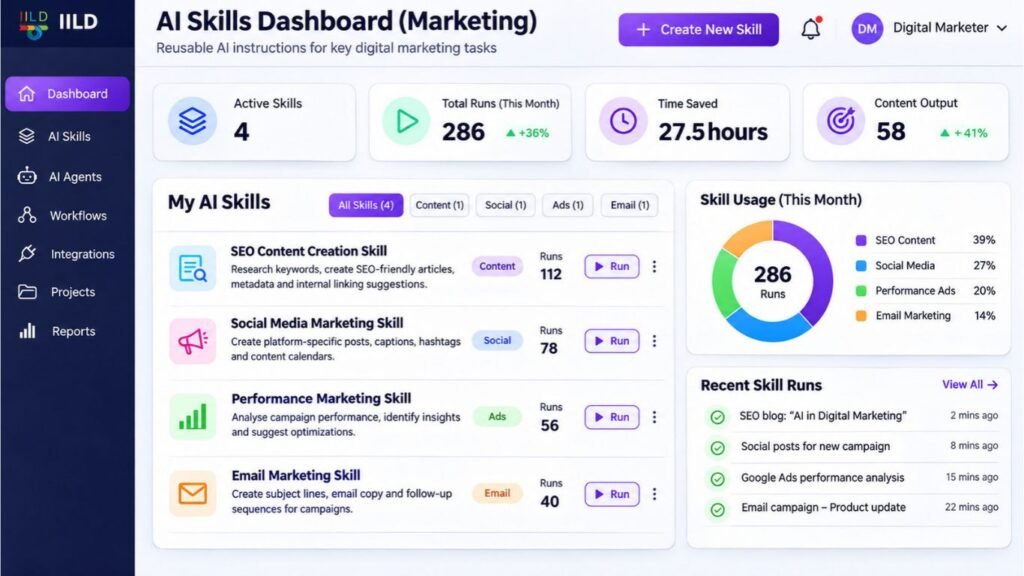
AI Skills are reusable sets of instructions, resources, and sometimes scripts that help an AI assistant complete specific tasks consistently.
Instead of explaining the same requirements every time, marketers can create a Skill that defines how a particular activity should be performed.
Think of an AI Skill as a reusable marketing SOP that an AI assistant can follow.
For example, a digital marketing team regularly publishes SEO blog articles. Each article needs keyword research, search intent analysis, structured headings, internal linking suggestions, metadata, and a content quality review.
Rather than repeating these instructions for every article, the team can create an SEO Content Skill containing the complete process.
Practical Applications of AI Skills in Marketing
1. SEO Content Creation Skill
A reusable SEO workflow can include:
- Primary and secondary keyword identification.
- Search intent analysis.
- Competitor content research.
- SEO-friendly article structure.
- Content writing guidelines.
- Internal linking recommendations.
- SEO title and meta description generation.
- Content quality checks.
2. Social Media Marketing Skill
A social media Skill can contain brand guidelines, target audience details, tone of voice, content formats, platform requirements, and CTA guidelines.
It can help marketers prepare consistent content for Facebook, Instagram, LinkedIn, and other platforms.
3. Performance Marketing Skill
A performance marketing Skill can guide AI through:
- Campaign objective analysis.
- Audience and offer evaluation.
- Advertising creative review.
- Campaign metric analysis.
- Budget and conversion performance assessment.
- Optimization recommendations.
4. Email Marketing Skill
An email marketing Skill can define how to prepare subject lines, email copy, audience-specific messaging, follow-up sequences, and campaign reports.
5. Marketing Reporting Skill
A reporting Skill can explain how to calculate and present metrics such as impressions, clicks, CTR, CPC, conversions, conversion rate, and ROAS.
Example: Building an SEO Content Skill
Imagine a marketer who manages multiple websites and publishes several articles every month.
The marketer can create a reusable Skill with these instructions:
- Identify the primary keyword and related search terms.
- Understand the search intent.
- Prepare an SEO-friendly article outline.
- Write informative and original content.
- Include relevant examples and practical applications.
- Suggest internal linking opportunities.
- Generate SEO titles, meta descriptions, and URL slugs.
- Review readability, factual accuracy, and content quality.
The result is a repeatable content production process rather than a collection of unrelated prompts.
Platforms such as ChatGPT, Claude, and Microsoft Copilot support different forms of reusable Skills or specialized agent capabilities. Their implementation and availability vary by platform.
ChatGPT Learn+2
3. What Are AI Plugins, Connectors, and Integrations?
An AI assistant can generate content and provide recommendations, but many marketing tasks require access to information stored in external applications.
For example, a marketer may need advertising performance data from Meta Ads, website traffic information from Google Analytics 4, keyword information from research tools, or customer details from a CRM.
This is where Plugins, connectors, and integrations become useful.
A simple way to understand them is:
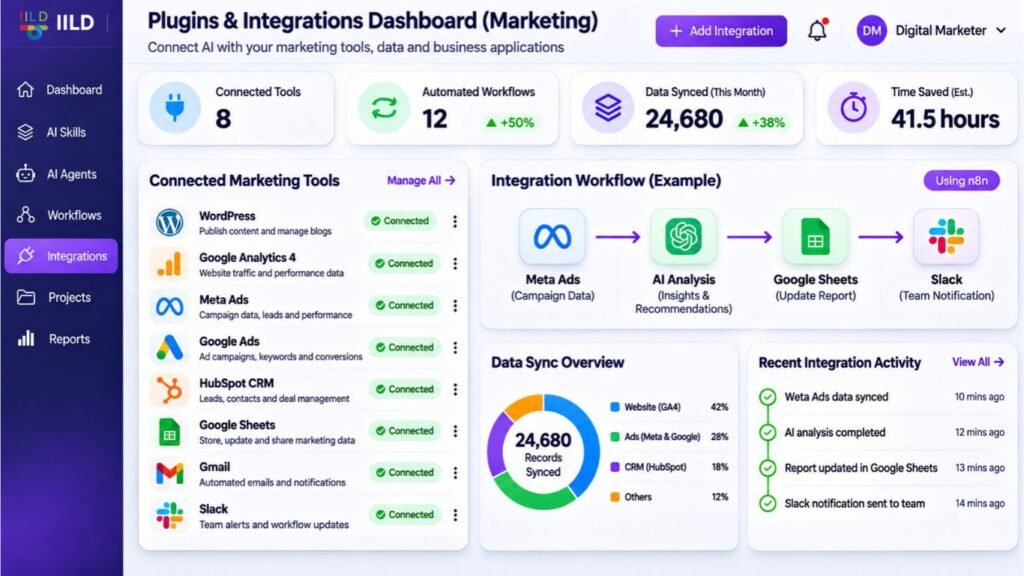
Skills explain how to perform a task, while connected tools provide access to information and actions needed to complete it.
A Plugin can package reusable workflows and connected capabilities into an installable bundle. A connector or integration provides a connection between an AI assistant and an external service.
Practical Applications in Marketing
1. SEO Research and Website Analysis
Connected research and website tools can help marketers retrieve relevant information, inspect pages, and support SEO research.
2. Advertising Analytics
Authorized integrations can retrieve advertising data and help marketers review campaign performance.
3. CRM and Lead Management
CRM connections can support permitted actions such as retrieving customer information, updating records, and organizing enquiries.
4. Email Marketing
Email integrations can help marketers find relevant messages, prepare drafts, and perform authorized communication tasks.
5. Marketing Automation
Connected applications can transfer information between platforms and support workflows such as lead notifications, campaign reporting, and task management.
Example: Connecting AI with Marketing Applications
Suppose a marketing manager wants to prepare a monthly Meta Ads report.
Without a connection, the manager may need to:
- Open Meta Ads Manager.
- Export campaign performance data.
- Download the report.
- Upload it to an AI assistant.
- Ask the assistant to analyse the information.
- Prepare a separate report.
With an authorized integration, some of these steps can happen through the connected service, depending on its capabilities and permissions.
Understanding MCP: How AI Connects with External Tools
One important technology behind modern AI integrations is the Model Context Protocol (MCP).
MCP is an open standard that allows AI applications to connect with external tools and information sources through a consistent interface.
For example, an MCP server may expose tools that allow an AI assistant to:
- Search approved business documents.
- Retrieve information from a CRM.
- Access project management information.
- Interact with supported applications.
- Perform authorized actions.
In current OpenAI documentation, Plugins can package Skills and MCP servers together. This means a Plugin may provide both reusable workflow instructions and connected tools.
ChatGPT Learn+1
For marketers, the important distinction is that not every integration is a Plugin, and not every Plugin is simply a connection to an external application.
4. What Are AI Agents and How Do They Work?
AI Agents take AI-powered workflows a step further.
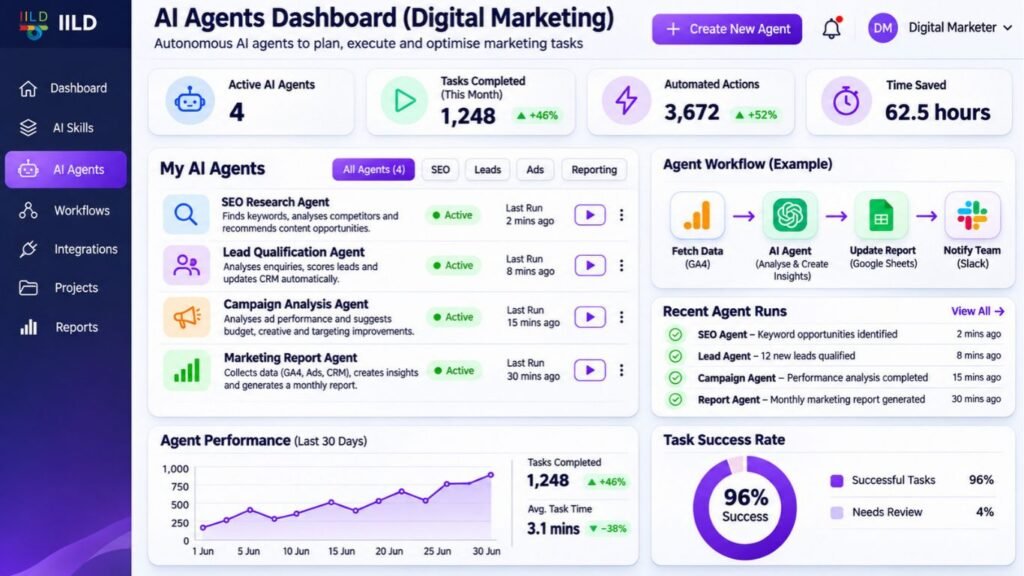
An AI Agent is a system designed to work toward a defined objective by interpreting information, deciding which steps to take, and using available tools to perform tasks.
Unlike a basic chatbot that primarily responds to individual instructions, an AI Agent can coordinate multiple steps within a workflow.
Think of an AI Agent as a digital assistant that can plan and carry out a defined sequence of tasks using approved tools and instructions.
For example, a marketing team may need to manage incoming enquiries from a website.
An AI Agent could be configured to:
- Receive a new enquiry.
- Read the submitted information.
- Categorize the enquiry by service or course interest.
- Summarize the prospect’s requirements.
- Update an authorized CRM.
- Prepare a personalized follow-up draft.
- Notify the relevant sales team member.
The agent can coordinate these activities, while sensitive actions and important customer communication remain subject to human review.
Types of Marketing Tasks AI Agents Can Support
1. SEO Research Agent
Can assist with keyword research, competitor content analysis, content gap identification, and SEO brief preparation using approved research tools.
2. Social Media Agent
Can help organize content ideas, prepare platform-specific captions, generate content schedules, and draft post variations.
3. Advertising Analysis Agent
Can retrieve authorized campaign data, summarize performance changes, and prepare recommendations for a marketer to review.
4. Lead Qualification Agent
Can classify incoming enquiries, summarize customer requirements, and suggest suitable follow-up actions.
5. Reporting Agent
Can collect information from connected sources, prepare summaries, and generate regular marketing reports.
6. Marketing Research Agent
Can gather information from approved sources, organize findings, and prepare research summaries with references.
AI Agent vs. Traditional Chatbot
| Traditional chatbot | AI Agent |
| Primarily responds to user questions | Can work toward a defined objective |
| Often follows a limited conversation flow | Can coordinate multiple workflow steps |
| Usually provides information | Can use connected tools to perform actions |
| May require instructions at each stage | Can manage parts of a multi-step process |
| Often focused on conversation | Focused on completing a task or workflow |
However, an AI Agent is not automatically more accurate or reliable than a chatbot. Its performance depends on its instructions, tools, permissions, data quality, and safeguards.
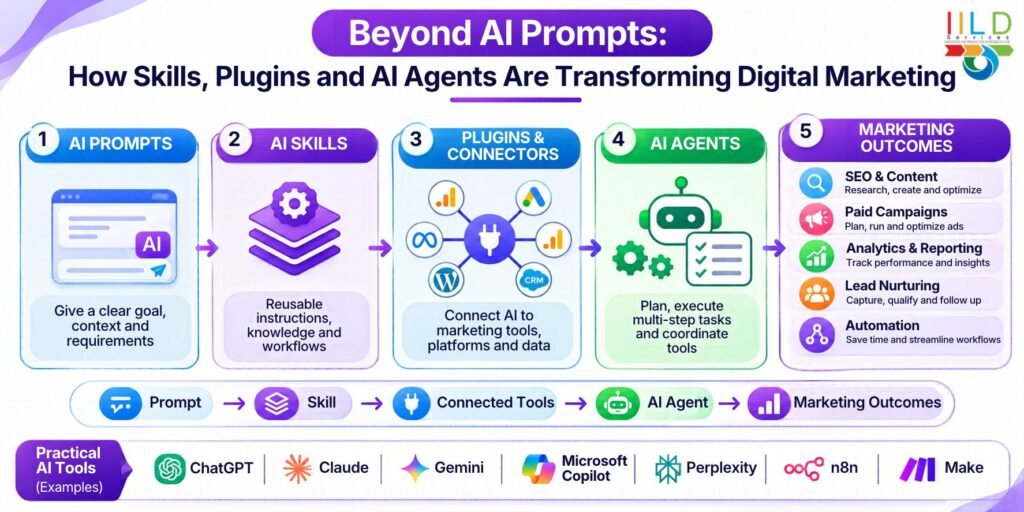
5. AI Skills vs. Plugins vs. AI Agents: Understanding the Differences
These three concepts are connected, but they serve different purposes in an AI-powered marketing workflow.
| Feature | AI Skills | Plugins / Integrations | AI Agents |
| Main purpose | Define repeatable processes | Connect tools and services | Coordinate tasks toward an objective |
| Primary function | Provide instructions and expertise | Provide access to data and actions | Plan and execute multiple steps |
| Reusability | Reuse workflows | Reuse connected capabilities | Reuse configured task workflows |
| Marketing example | SEO content workflow | Meta Ads data connection | Campaign analysis agent |
| Main benefit | Consistency | Connectivity | Task coordination |
Skills
How to perform the task
Plugins
What tools AI can access
AI Agents
How tasks get coordinated
Example: Automated SEO workflow
- Skill: Follow the SEO research and content-writing process.
- Plugin / Integration: Access approved research and website tools.
- AI Agent: Coordinate research, content preparation, and reporting tasks.
These capabilities are complementary. A Skill can guide an AI Agent, while an Agent can use connected tools to complete the workflow.
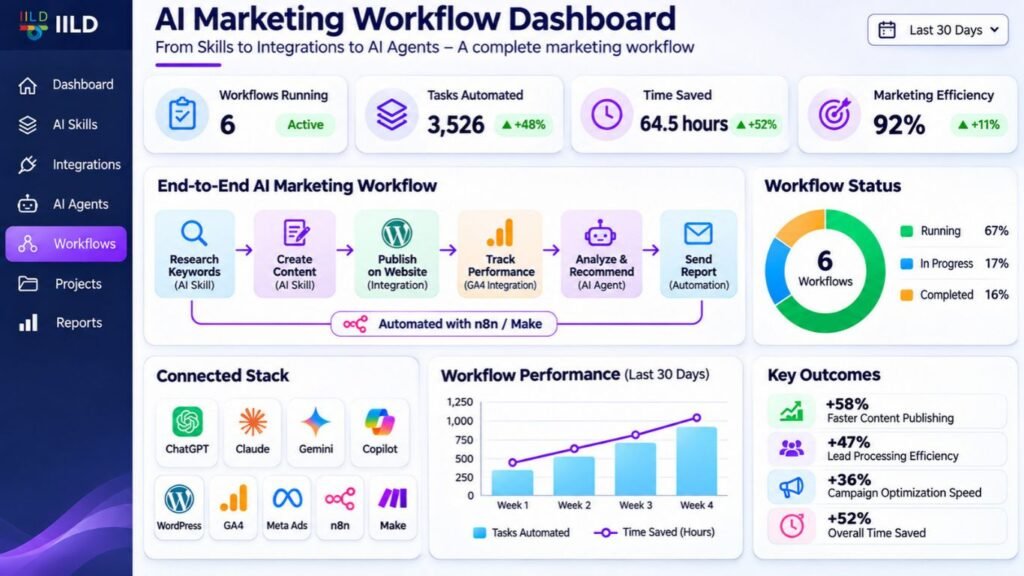
6. How to Combine Skills, Plugins, and AI Agents in a Marketing Workflow
The real value of AI comes from combining these capabilities to solve practical marketing challenges.
Consider an SEO campaign for a digital marketing training website.
The objective is to improve organic visibility, publish relevant content, and generate qualified course enquiries.
Step 1: Define the Marketing Objective
Identify the target audience, website, business objective, primary keywords, and expected results.
For example, the goal may be to attract working professionals searching for AI-powered performance marketing training.
Step 2: Apply an SEO Skill
The Skill guides the AI assistant through:
- Keyword research.
- Search intent analysis.
- Content gap identification.
- Blog outline creation.
- SEO content development.
- Metadata preparation.
- Content quality review.
Step 3: Connect Relevant Marketing Applications
Use authorized integrations to access relevant website information, analytics, keyword research resources, or other marketing data.
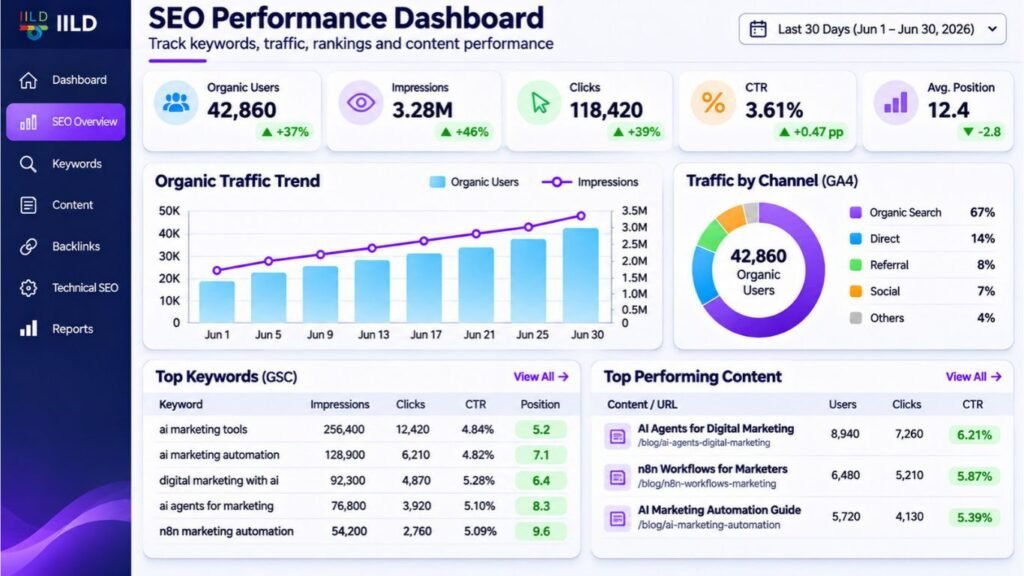
For example, Google Search Console can provide information about search impressions, clicks, CTR, and keyword visibility.
Step 4: Use an AI Agent to Coordinate Tasks
An AI Agent can coordinate the defined workflow, collect relevant information, prepare content drafts, and organize the next steps.
Human review remains important before publishing content or making significant marketing changes.
Step 5: Prepare Marketing Reports
The AI system can help organize campaign and website performance information into a structured report.
The marketing team can review organic traffic, keyword visibility, course enquiries, and conversions to understand campaign performance.
Step 6: Optimize the Strategy
Based on verified results, marketers can improve existing articles, update keywords, prepare new content, and refine the marketing workflow.
This approach turns separate marketing activities into a more organized and measurable process.
7. Practical Examples Across Different Digital Marketing Activities
Here are some ways Skills, Plugins, and AI Agents can be applied to different marketing functions.
| Marketing activity | AI Skill | Integration | AI Agent application |
| SEO | SEO content workflow | Search and website tools | Coordinate research and content preparation |
| Social Media | Brand-specific content guidelines | Social media management tools | Organize content and publishing tasks |
| Meta Ads | Campaign analysis process | Meta Marketing API | Prepare campaign performance summaries |
| Google Ads | Paid advertising analysis | Google Ads API | Identify changes requiring review |
| Email Marketing | Email writing workflow | Email platform | Organize and draft follow-ups |
| Lead Generation | Lead qualification rules | CRM integration | Categorize and route enquiries |
| Analytics | Reporting instructions | GA4 integration | Prepare scheduled performance reports |
The level of automation depends on the tools, permissions, and workflows available. An AI Agent should not be assumed to have access to every platform or be allowed to perform every action.
8. AI Tools Every Digital Marketer Should Understand
Different AI tools serve different purposes. Rather than using every available application, marketers should understand which tools are relevant to their work.
ChatGPT
Supports content development, research, campaign analysis, reusable Skills, connected tools, and AI-assisted workflows.
Claude
Useful for long-form content, research, document analysis, reusable Skills, and structured work.
Google Gemini
Supports research, content creation, analysis, and compatible Google Workspace workflows.
Microsoft Copilot
Assists with documents, spreadsheets, presentations, and productivity tasks in supported Microsoft applications.
Perplexity
Supports preliminary research, information discovery, and source identification.
n8n
Helps connect applications, integrate AI models, and create multi-step marketing automation workflows.
Make
Supports application integrations and automation for lead management, notifications, and marketing reporting.
Why n8n and Make Matter for AI-Powered Marketing
AI assistants can generate recommendations and prepare information, but businesses often need a way to connect multiple applications and execute repeatable processes.
This is where workflow automation platforms such as n8n and Make become useful.
For example, an automated lead management workflow could:
- Receive a website enquiry.
- Store the information in a CRM.
- Use an AI model to categorize the enquiry.
- Notify the relevant sales representative.
- Prepare a personalized follow-up draft.
- Update the lead status after human review.
This can reduce manual administrative work and improve the consistency of lead management.
9. Common Mistakes Marketers Should Avoid When Using AI Workflows
Adopting AI does not automatically improve marketing performance. Poorly designed workflows can create additional work and introduce unnecessary risks.
1. Using AI tools without a clear objective
Do not choose tools simply because they are popular. Identify the business problem first.
2. Confusing Skills with integrations
A Skill provides reusable instructions. An integration provides access to external information or actions. They solve different problems.
3. Expecting AI Agents to work without supervision
Agents can make incorrect decisions, misunderstand instructions, or use incomplete information. Important actions should have suitable approval and review processes.
4. Automating inefficient processes
Before automating a workflow, identify unnecessary steps and improve the underlying process.
5. Connecting too many applications
Every integration should have a clear purpose. Excessive connections can make workflows harder to manage and secure.
6. Ignoring data privacy
Use approved tools and follow organizational policies when working with customer details, business information, and advertising account data.
7. Measuring success only through time saved
Also measure accuracy, output quality, conversion performance, and the actual business impact of the workflow.
10. How to Start Building AI-Powered Marketing Workflows
You do not need to automate your entire marketing department at once. Start with one repetitive activity and gradually expand.
A practical 5-step implementation plan
- Identify one repetitive task
Choose SEO content preparation, campaign reporting, social media planning, or lead management.
- Create a reusable AI Skill
Document the instructions, process, expected output, and quality requirements.
- Connect the necessary applications
Select suitable Plugins, connectors, APIs, or integrations based on the task.
- Build an AI-assisted workflow
Use an AI Agent or an automation platform such as n8n or Make where multiple steps need coordination.
- Measure and improve
Review accuracy, time saved, errors, team adoption, and business results before expanding the workflow.
For example, a marketing team could start by automating weekly campaign reporting. Once the process is reliable, it could introduce additional workflows for lead classification, SEO research, and content planning.
The objective is to build a manageable system that solves real marketing problems rather than introducing automation everywhere.
Conclusion: The Future of Digital Marketing Is Beyond AI Prompts
AI-powered marketing is evolving from individual chatbot interactions towards structured workflows, connected applications, and task-oriented AI systems.
Understanding AI Skills, Plugins, Integrations, and AI Agents helps marketers identify how these capabilities can work together.
- AI Skills provide reusable instructions and expertise for repeatable tasks.
- Plugins and Integrations connect AI assistants with external applications, information, and tools.
- AI Agents coordinate multiple steps to achieve defined objectives using available tools and permissions.
- Automation platforms such as n8n and Make help connect applications and execute repeatable workflows.
When these capabilities are combined, marketing teams can develop practical systems for SEO, social media management, paid advertising, analytics, lead generation, and reporting.
For IILD Services, this is an important part of practical AI-powered performance marketing education. Students, working professionals, marketers, entrepreneurs, and corporate teams need to understand not only how to use AI tools but also how to apply them to real business challenges.
The next stage of digital marketing is not about collecting more AI applications or writing longer prompts. It is about developing the skills to design effective workflows, connect the right tools, evaluate AI outputs, and improve measurable marketing performance.
Frequently Asked Questions (FAQs)
1. What are AI Skills in digital marketing?
AI Skills are reusable instructions, resources, and workflows that help an AI assistant perform specific marketing tasks consistently, such as SEO research, content creation, campaign analysis, and reporting.
2. What is the difference between AI Skills and Plugins?
Skills provide task-specific instructions and workflows. Plugins are installable packages that can combine reusable Skills with connected tools and other capabilities. The exact terminology and implementation vary across AI platforms.
3. What are AI Agents in marketing?
AI Agents are systems that can coordinate multiple steps to complete defined marketing tasks. They may assist with campaign analysis, lead qualification, content workflows, and reporting using authorized tools.
4. Can AI Agents manage digital marketing campaigns automatically?
AI Agents can support campaign analysis and some authorized management activities, depending on their integrations and permissions. Budget changes, campaign launches, and other important actions should have suitable safeguards and human approval.
5. How are n8n and Make useful for marketing automation?
n8n and Make connect compatible applications and help automate repetitive processes such as lead notifications, CRM updates, reporting, and data transfer between marketing platforms.
6. Which AI tools should digital marketers learn?
Marketers can start with ChatGPT, Claude, Gemini, Microsoft Copilot, and Perplexity for research and productivity. They can then explore n8n, Make, APIs, and AI Agents to build connected marketing workflows.
7. Do marketers need coding knowledge to build AI Agents?
Not always. No-code and low-code automation platforms allow marketers to build many workflows without extensive programming. More complex integrations may require API knowledge, technical configuration, or developer support.
8. Why are AI-powered workflows important for marketing teams? They help standardize repetitive tasks, connect applications, reduce manual effort, and support more consistent marketing operations. Their value should be evaluated through accuracy, productivity, and business outcomes.